
To re-export an invoice that has already been exported to QuickBooks, you:
- First, delete the invoice from QuickBooks.
- Then, in ServiceBox, "unlink" the specific, current invoice in ServiceBox by unchecking the checkbox with the checkmark at the bottom of the invoice, on the computer screen (see screenshot indication below).
- If you need to modify the invoice in any way (i.e. add an interest charge to the invoice), now is the time to make this modification.
- Next, save the change using the save button at the bottom of the screen on the first tab of the invoice.
- Lastly, rerun the ServiceBox Accounting Connector, and the invoice should move again to your accounting software, updated as necessary. 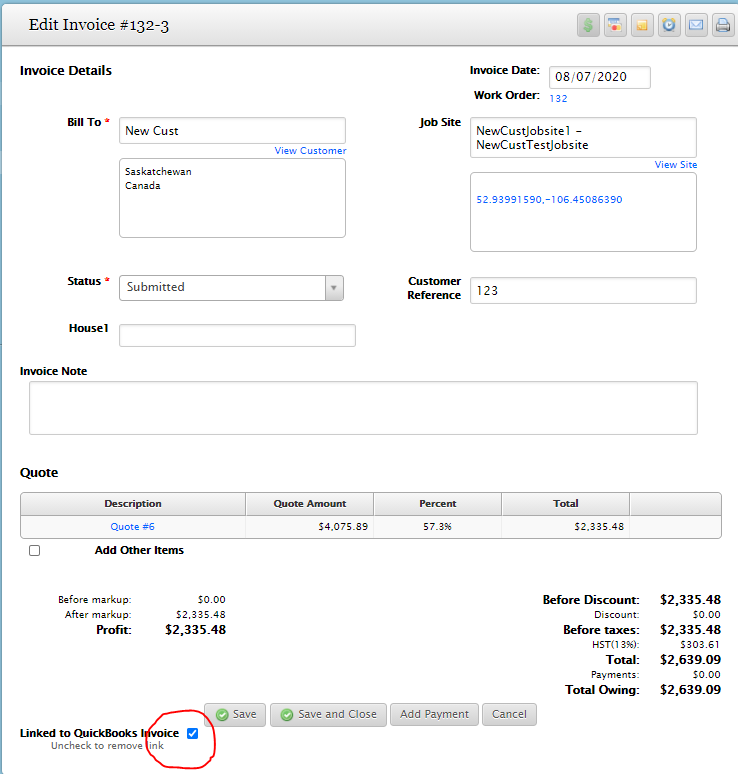
Need Help?
If you have any questions or need support, please click the Help button in your ServiceBox account or email us at support@getservicebox.com.