---
title: ServiceBox App setup for Field Tech User/Employee
description: Customize your default screen in the ServiceBox app to show scheduled jobs each day.
---
[Skip to content](https://learn.getservicebox.com/servicebox-app-setup-for-field-tech-user/employee#main-content)
English
Show submenu for translations
[](https://learn.getservicebox.com/knowledge-base?hsLang=en)
Open main navigation
Close main navigation
- English
Show submenu for translations
How can we help you?
- There are no suggestions because the search field is empty.
1. [ServiceBox Support Knowledge Base](https://learn.getservicebox.com/?hsLang=en)
2. [ServiceBox Mobile](https://learn.getservicebox.com/servicebox-mobile?hsLang=en)
3. [Getting Started](https://learn.getservicebox.com/servicebox-mobile?hsLang=en#getting-started)
# ServiceBox App setup for Field Tech User/Employee
## Customize your default screen to show daily scheduled jobs for field techs and users.
### **Summary**
In this article, we will walk you through the process of setting up "My Preferences" for each individual user or field tech employee after their login to ServiceBox. By following these steps, you will ensure that the proper screen comes up in the ServiceBox App, displaying all jobs scheduled for the day, including those added on the same day.
### **Step by step process**
#### **Access the Calendar Screen**
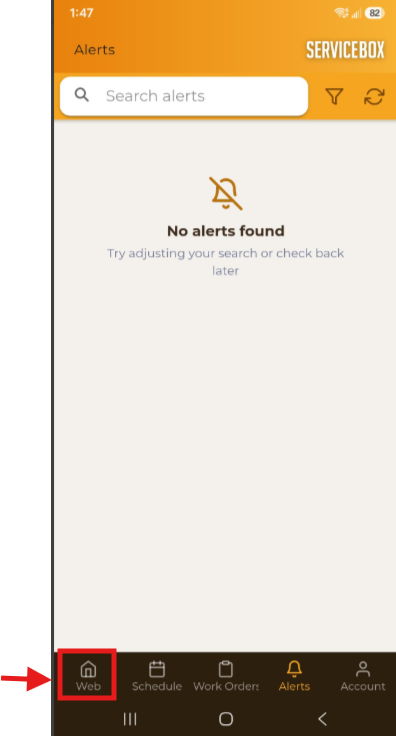
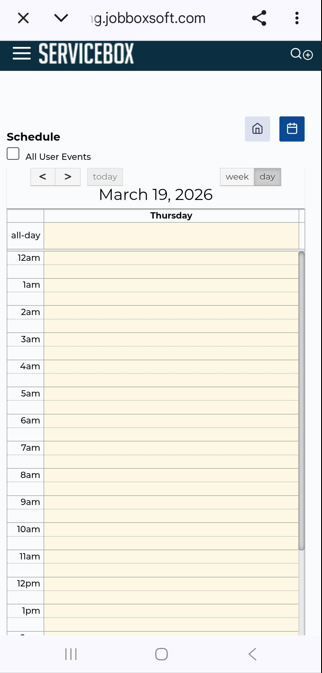
- Ensure that you are on the Calendar screen in the ServiceBox App on your smartphone.
- If you find yourself on the "Alert" screen, tap on the "Web" icon at the bottom left and switch to the ServiceBox Dashboard/Screen.
#### **Set Up Default Screen**
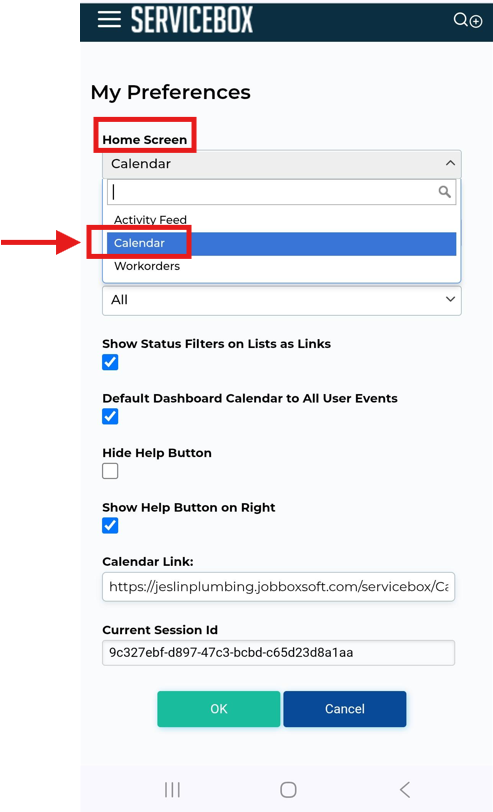
If your screen does not match the one shown above, here's how you can set it up as your default screen for easy access.
- At the top of the screen, you will see three white lines and the ServiceBox logo
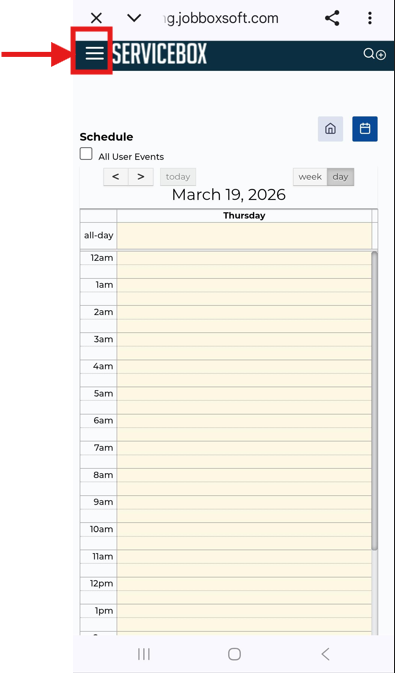
- Tap on this intersection to reveal a menu, and then find and select "My Preferences."
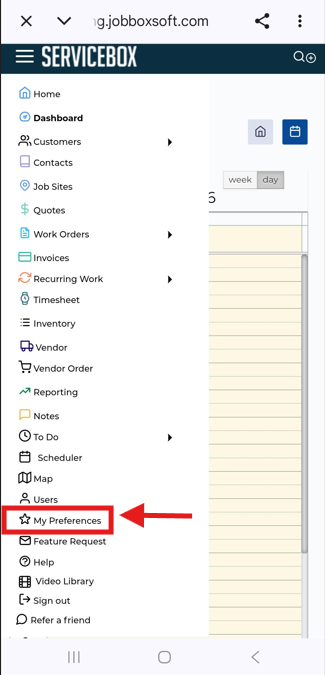
- Once you select "My Preferences," you will be directed to a screen where you can customize your settings. Pay special attention to the options indicated in the screenshots and adjust them accordingly to your preferences.
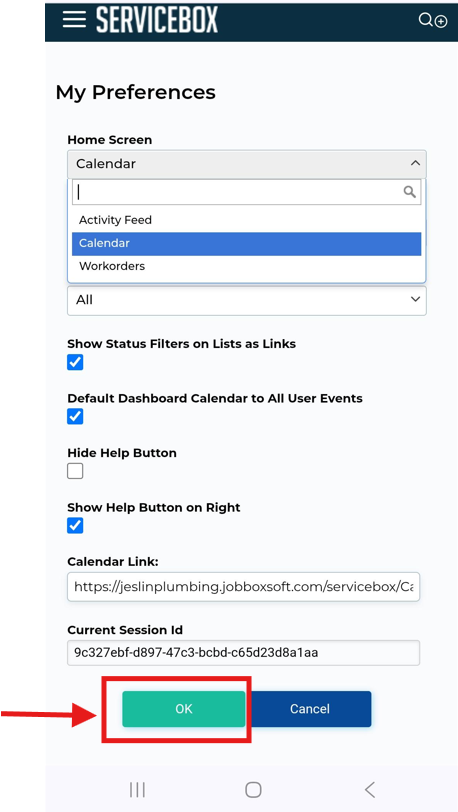
- After making the necessary changes to your preferences, tap on the "OK" or green button at the bottom to save the settings.
#### **Return to Home Screen**
- To go back to the home screen, tap again on the white lines/ServiceBox logo at the top left corner of the screen. Then, choose "Home". You should now see the desired setup displaying all your scheduled jobs for the day, including those added on the same day.
### **Need Help?**
If you have any questions or need support, please click the Help button in your ServiceBox account or email us at **support@getservicebox.com**.
- [Video Learning](https://learn.getservicebox.com/video-learning?hsLang=en#main-content)
- [Accounting Integrations](https://learn.getservicebox.com/video-learning?hsLang=en#accounting-integrations)
- [FAQs](https://learn.getservicebox.com/faqs?hsLang=en)
- [Getting started](https://learn.getservicebox.com/getting-started?hsLang=en#main-content)
- [User Guides](https://learn.getservicebox.com/getting-started?hsLang=en#user-guides)
- [ServiceBox Mobile](https://learn.getservicebox.com/servicebox-mobile?hsLang=en#main-content)
- [Getting Started](https://learn.getservicebox.com/servicebox-mobile?hsLang=en#getting-started)
- [User Guide Technician](https://learn.getservicebox.com/servicebox-mobile?hsLang=en#user-guide-technician)
- [User Guide Admin](https://learn.getservicebox.com/servicebox-mobile?hsLang=en#user-guide-admin)
- [FAQ](https://learn.getservicebox.com/servicebox-mobile?hsLang=en#faq)
- [New Release](https://learn.getservicebox.com/servicebox-mobile?hsLang=en#new-release)
- [Invoices](https://learn.getservicebox.com/invoices?hsLang=en#main-content)
- [Getting Started](https://learn.getservicebox.com/invoices?hsLang=en#getting-started)
- [Advanced Functionality](https://learn.getservicebox.com/invoices?hsLang=en#advanced-functionality)
- [User Guide](https://learn.getservicebox.com/invoices?hsLang=en#user-guide)
- [FAQ](https://learn.getservicebox.com/invoices?hsLang=en#faq)
- [Quotes](https://learn.getservicebox.com/quotes?hsLang=en#main-content)
- [Getting Started](https://learn.getservicebox.com/quotes?hsLang=en#getting-started)
- [User Guide](https://learn.getservicebox.com/quotes?hsLang=en#user-guide)
- [Advanced Functionality](https://learn.getservicebox.com/quotes?hsLang=en#advanced-functionality)
- [FAQ](https://learn.getservicebox.com/quotes?hsLang=en#faq)
- [Work Orders](https://learn.getservicebox.com/work-orders?hsLang=en#main-content)
- [Getting Started](https://learn.getservicebox.com/work-orders?hsLang=en#getting-started)
- [User Guide](https://learn.getservicebox.com/work-orders?hsLang=en#user-guide)
- [Advanced Functionalities](https://learn.getservicebox.com/work-orders?hsLang=en#advanced-functionalities)
- [Work Order - FAQ](https://learn.getservicebox.com/work-orders?hsLang=en#work-order-faq)
- [Job Sites](https://learn.getservicebox.com/job-sites?hsLang=en#main-content)
- [User Guide](https://learn.getservicebox.com/job-sites?hsLang=en#user-guide)
- [Advanced Functionality](https://learn.getservicebox.com/job-sites?hsLang=en#advanced-functionality)
- [FAQ](https://learn.getservicebox.com/job-sites?hsLang=en#faq)
- [Recurring Work](https://learn.getservicebox.com/recurring-work?hsLang=en#main-content)
- [User Guide](https://learn.getservicebox.com/recurring-work?hsLang=en#user-guide)
- [FAQ](https://learn.getservicebox.com/recurring-work?hsLang=en#faq)
- [Scheduler](https://learn.getservicebox.com/scheduler?hsLang=en#main-content)
- [User Guide](https://learn.getservicebox.com/scheduler?hsLang=en#user-guide)
- [Advanced Functionality](https://learn.getservicebox.com/scheduler?hsLang=en#advanced-functionality)
- [FAQ](https://learn.getservicebox.com/scheduler?hsLang=en#faq)
- [Timesheets](https://learn.getservicebox.com/timesheets?hsLang=en#main-content)
- [User Guide](https://learn.getservicebox.com/timesheets?hsLang=en#user-guide)
- [Advanced Functionality](https://learn.getservicebox.com/timesheets?hsLang=en#advanced-functionality)
- [FAQ](https://learn.getservicebox.com/timesheets?hsLang=en#faq)
- [Inventory](https://learn.getservicebox.com/inventory?hsLang=en#main-content)
- [User Guides](https://learn.getservicebox.com/inventory?hsLang=en#user-guides)
- [FAQ](https://learn.getservicebox.com/inventory?hsLang=en#faq)
- [Vendor Orders](https://learn.getservicebox.com/vendor-orders?hsLang=en#main-content)
- [Getting Started](https://learn.getservicebox.com/vendor-orders?hsLang=en#getting-started)
- [Advanced Functionality](https://learn.getservicebox.com/vendor-orders?hsLang=en#advanced-functionality)
- [User Guide](https://learn.getservicebox.com/vendor-orders?hsLang=en#user-guide)
- [FAQ](https://learn.getservicebox.com/vendor-orders?hsLang=en#faq)
- [Reporting](https://learn.getservicebox.com/reporting?hsLang=en#main-content)
- [Getting Started](https://learn.getservicebox.com/reporting?hsLang=en#getting-started)
- [FAQ](https://learn.getservicebox.com/reporting?hsLang=en#faq)
- [User Guide](https://learn.getservicebox.com/reporting?hsLang=en#user-guide)
- [Integrations](https://learn.getservicebox.com/integrations?hsLang=en#main-content)
- [Accounting Connector](https://learn.getservicebox.com/integrations?hsLang=en#accounting-connector)
- [ServiceBox Payments](https://learn.getservicebox.com/integrations?hsLang=en#servicebox-payments)
- [Product Updates](https://learn.getservicebox.com/product-updates?hsLang=en)
- [Data Services](https://learn.getservicebox.com/data-services?hsLang=en#main-content)
- [FAQ](https://learn.getservicebox.com/data-services?hsLang=en#faq)
- [QuickBooks Desktop](https://learn.getservicebox.com/quickbooks-desktop?hsLang=en#main-content)
- [User Guide](https://learn.getservicebox.com/quickbooks-desktop?hsLang=en#user-guide)
- [Getting Started](https://learn.getservicebox.com/quickbooks-desktop?hsLang=en#getting-started)
- [FAQ](https://learn.getservicebox.com/quickbooks-desktop?hsLang=en#faq)
- [QuickBooks Online](https://learn.getservicebox.com/quickbooks-online?hsLang=en#main-content)
- [Getting Started](https://learn.getservicebox.com/quickbooks-online?hsLang=en#getting-started)
- [User Guide](https://learn.getservicebox.com/quickbooks-online?hsLang=en#user-guide)
- [FAQ](https://learn.getservicebox.com/quickbooks-online?hsLang=en#faq)
- [Printing](https://learn.getservicebox.com/printing?hsLang=en)
- [Sage 50 (Canada)](https://learn.getservicebox.com/sage-50-canada?hsLang=en#main-content)
- [Configuration](https://learn.getservicebox.com/sage-50-canada?hsLang=en#configuration)
- [FAQ](https://learn.getservicebox.com/sage-50-canada?hsLang=en#faq)
- [User Guide](https://learn.getservicebox.com/sage-50-canada?hsLang=en#user-guide)
- [First Steps for ServiceBox Users](https://learn.getservicebox.com/first-steps-for-servicebox-users?hsLang=en#main-content)
- [User Guide](https://learn.getservicebox.com/first-steps-for-servicebox-users?hsLang=en#user-guide)
- [FAQ](https://learn.getservicebox.com/first-steps-for-servicebox-users?hsLang=en#faq)
- [Configuring Your ServiceBox Site](https://learn.getservicebox.com/configuring-your-servicebox-site?hsLang=en#main-content)
- [Getting Started](https://learn.getservicebox.com/configuring-your-servicebox-site?hsLang=en#getting-started)
- [User Guides](https://learn.getservicebox.com/configuring-your-servicebox-site?hsLang=en#user-guides)
- [FAQ](https://learn.getservicebox.com/configuring-your-servicebox-site?hsLang=en#faq)
- [Advanced Functionality](https://learn.getservicebox.com/configuring-your-servicebox-site?hsLang=en#advanced-functionality)
- [Customer](https://learn.getservicebox.com/customer?hsLang=en#main-content)
- [User Guide](https://learn.getservicebox.com/customer?hsLang=en#user-guide)
- [Advanced Functionality](https://learn.getservicebox.com/customer?hsLang=en#advanced-functionality)
- [FAQ](https://learn.getservicebox.com/customer?hsLang=en#faq)
- [Notes](https://learn.getservicebox.com/notes?hsLang=en)
- [To Dos](https://learn.getservicebox.com/to-dos?hsLang=en#main-content)
- [Getting Started](https://learn.getservicebox.com/to-dos?hsLang=en#getting-started)
- [To Dos - User Guide](https://learn.getservicebox.com/to-dos?hsLang=en#to-dos-user-guide)
- [Vendor](https://learn.getservicebox.com/vendor?hsLang=en#main-content)
- [User Guide](https://learn.getservicebox.com/vendor?hsLang=en#user-guide)
[![sblogo-whiteandtransparent120x30\[8666\]](https://learn.getservicebox.com/hs-fs/hubfs/sblogo-whiteandtransparent120x30%5B8666%5D.png?width=120&height=30&name=sblogo-whiteandtransparent120x30%5B8666%5D.png "sblogo-whiteandtransparent120x30[8666]")](https://learn.getservicebox.com/knowledge-base?hsLang=en)
Copyright © 2026