---
title: ServiceBox Mobile App Redesign & New Offline Feature Release
description: ServiceBox Mobile App Redesign & New Offline Feature Release
---
[Skip to content](https://learn.getservicebox.com/servicebox-mobile-app-release#main-content)
English
Show submenu for translations
[](https://learn.getservicebox.com/knowledge-base?hsLang=en)
Open main navigation
Close main navigation
- English
Show submenu for translations
How can we help you?
- There are no suggestions because the search field is empty.
1. [ServiceBox Support Knowledge Base](https://learn.getservicebox.com/?hsLang=en)
2. [ServiceBox Mobile](https://learn.getservicebox.com/servicebox-mobile?hsLang=en)
3. [New Release](https://learn.getservicebox.com/servicebox-mobile?hsLang=en#new-release)
# ServiceBox Mobile App Redesign & New Offline Feature Release
We're excited to introduce a major update to the ServiceBox Mobile App Offline Mode, designed to make working in the field faster, easier, and more reliable.
The ServiceBox Mobile App Offline Mode has been enhanced to provide a faster, more intuitive, and reliable experience for technicians working in the field. Whether you're working in areas with limited connectivity or preparing for a day of offline work, these improvements make it easier to find work orders, stay informed, and continue working with confidence.
What's Included in This Release
- Completely refreshed mobile interface
- Improved offline work order searching
- Offline access to employee and customer signatures
- Automatic hourly synchronization
- Manual Sync Now option
- Updated Account resources
- Clear offline status indicators
- Consistent role-based permissions
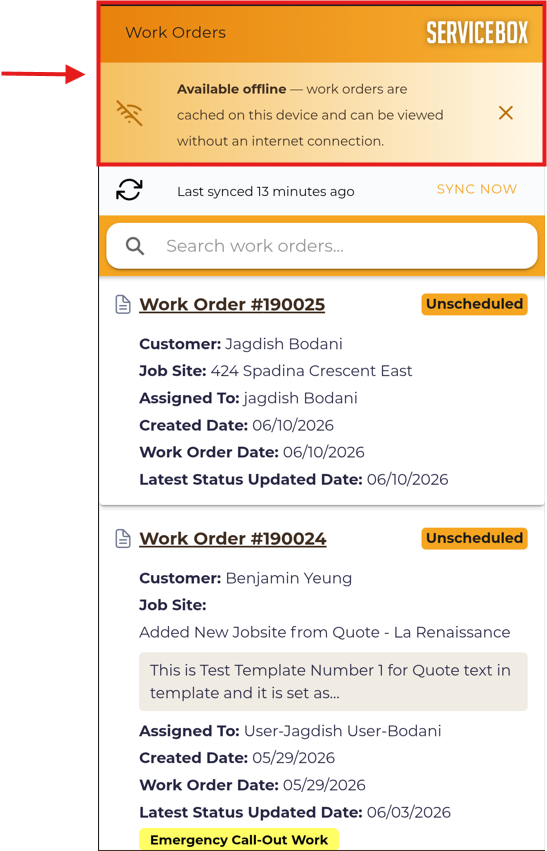
**1. Refreshed Mobile Experience**
The Offline Mode interface has been redesigned to match the latest ServiceBox branding and overall web experience.
The updated design provides:
- Cleaner navigation
- Improved readability
- Better spacing
- Modern ServiceBox branding
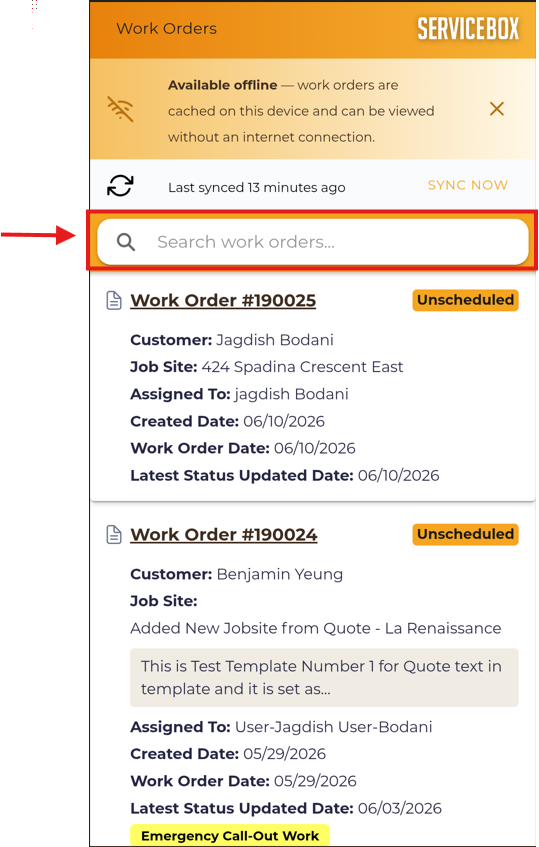
**2. Enhanced Offline Work Order Search**
Finding work orders while offline is now much easier.
Technicians can search cached work orders using:
- Customer Name
- Job Site
- Assigned Employee
- Month & Year
This makes locating jobs significantly faster, especially when large numbers of work orders are stored on the device.
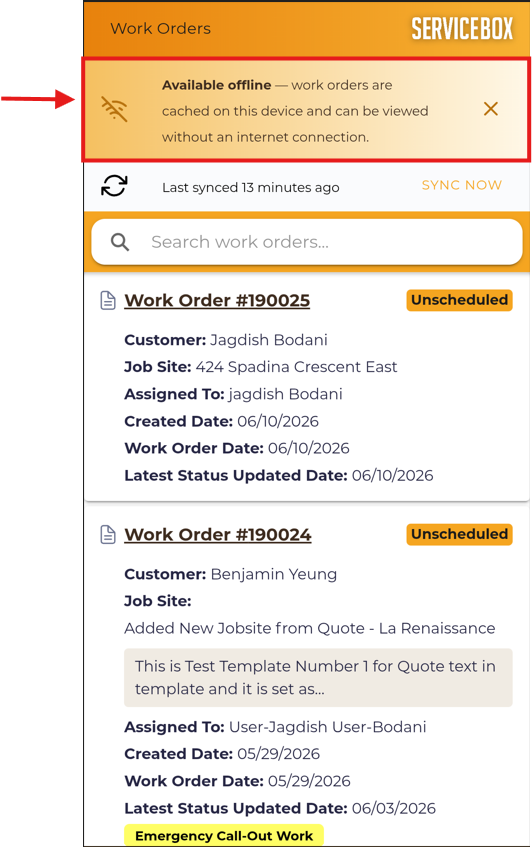
**3. Offline Status Indicators**
The app now makes it immediately obvious when you're working offline.
When internet connectivity is unavailable, the app displays:
- Offline banners visible
- Online-only features become unavailable
- Web links are disabled
- Offline status is clearly displayed, including on the login screen
This helps technicians understand exactly what information is available while offline.
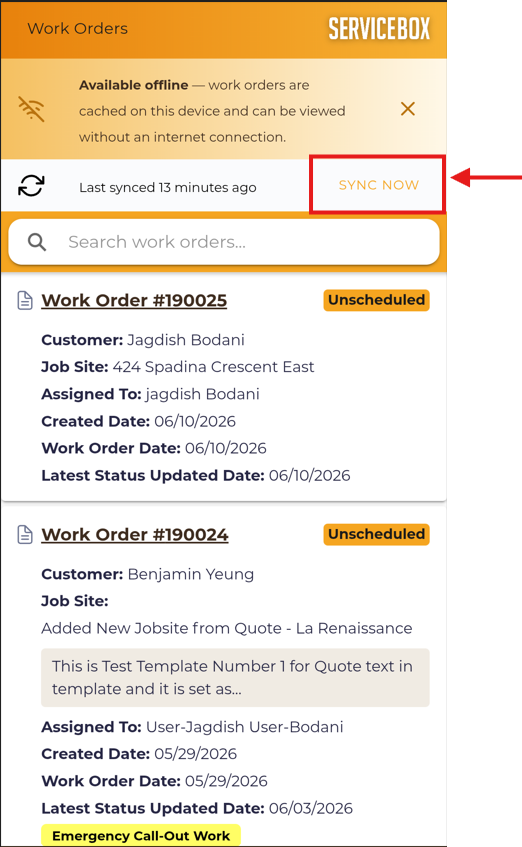
**4. Improved Synchronization**
Keeping offline data current is now easier than ever.
Automatic Synchronization - When an internet connection is available, the app automatically synchronizes offline data every hour.
Manual Synchronization - Need the latest information immediately? Simply tap Sync Now to manually refresh your offline data.
Both sync options are only available while you're online.
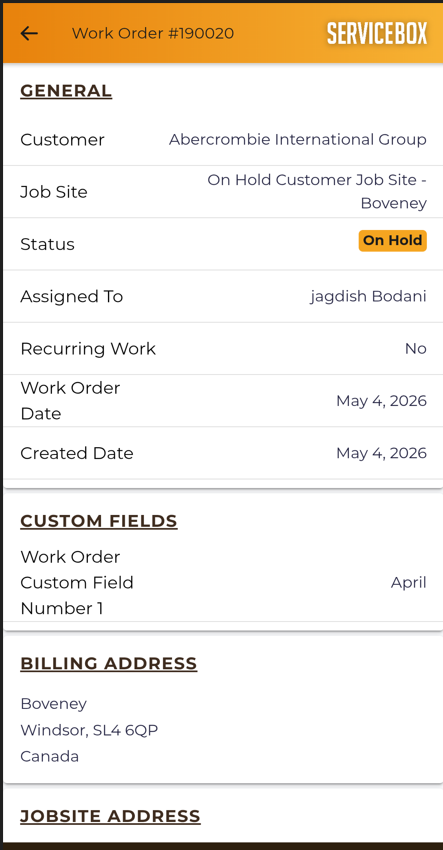
**5. View Work Order Details While Offline**
Technicians can continue viewing detailed work order information even without internet access.
Offline work orders include information such as:
- Customer
- Job Site
- Status
- Assigned Technician
- Work Order Date
- Custom Fields
- Billing Address
- Job Site Address
This ensures important job information is always available in the field.
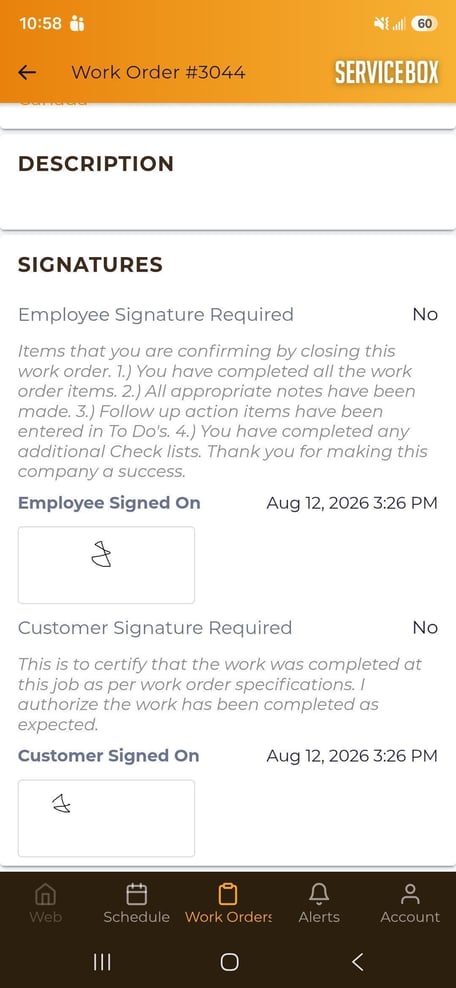
**6. View Signatures Offline**
One of the biggest improvements in this release is the ability to view signatures directly from the Work Order Details page while offline.
Both:
- Employee Signatures
- Customer Signatures
remain available after synchronization.
This allows technicians to verify completed work without reconnecting to the internet.
### 
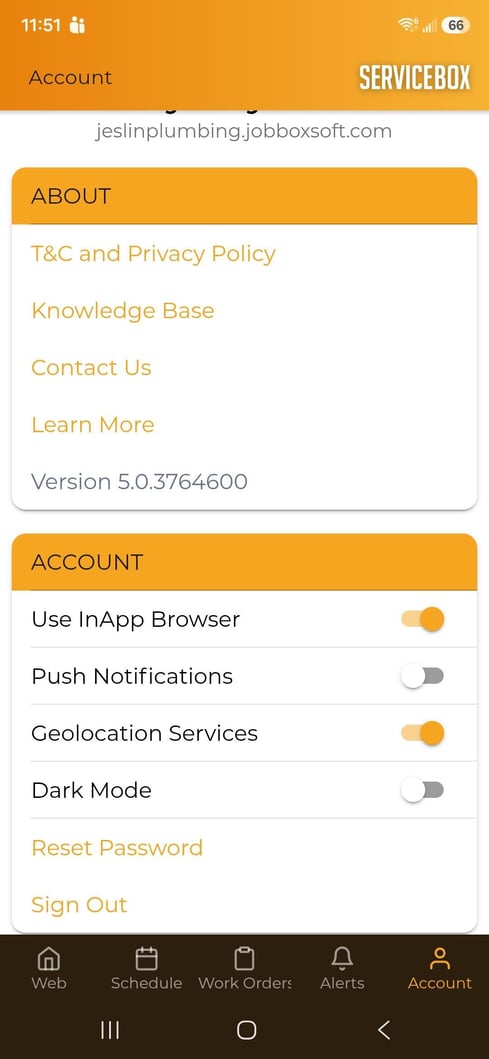
**7. Updated Account Section**
The Account page now includes quick access to helpful ServiceBox resources:
- Terms & Conditions
- Privacy Policy
- Knowledge Base
- Contact Us
- Learn More
These links automatically become unavailable while offline, ensuring users understand which features require an internet connection.
**8. Consistent Role-Based Permissions**
Offline Mode now fully respects the same user permissions configured within the ServiceBox web application. This means users will only have access to the work orders and information their assigned role permits.
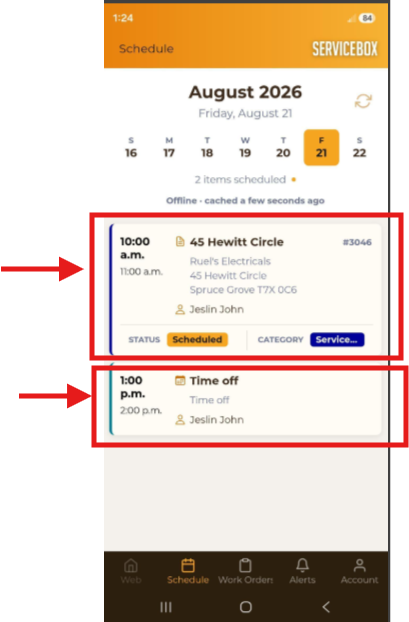
**9**. **Scheduler in offline mode**
- In offline mode, the Scheduler displays both scheduled work orders and events.
- Only the current week of the calendar or schedule is available offline.
**Built for Field Technicians**
These Offline Mode improvements have been designed to help technicians continue working efficiently regardless of internet availability. With improved searching, better synchronization, offline signatures, refreshed navigation, and clearer connection indicators, ServiceBox provides a faster and more dependable mobile experience in the field.
### **Need Help?**
If you have any questions or need support, please click the Help button in your ServiceBox account or email us at **support@getservicebox.com**.
- [Video Learning](https://learn.getservicebox.com/video-learning?hsLang=en#main-content)
- [Accounting Integrations](https://learn.getservicebox.com/video-learning?hsLang=en#accounting-integrations)
- [FAQs](https://learn.getservicebox.com/faqs?hsLang=en)
- [Getting started](https://learn.getservicebox.com/getting-started?hsLang=en#main-content)
- [User Guides](https://learn.getservicebox.com/getting-started?hsLang=en#user-guides)
- [ServiceBox Mobile](https://learn.getservicebox.com/servicebox-mobile?hsLang=en#main-content)
- [Getting Started](https://learn.getservicebox.com/servicebox-mobile?hsLang=en#getting-started)
- [User Guide Technician](https://learn.getservicebox.com/servicebox-mobile?hsLang=en#user-guide-technician)
- [User Guide Admin](https://learn.getservicebox.com/servicebox-mobile?hsLang=en#user-guide-admin)
- [FAQ](https://learn.getservicebox.com/servicebox-mobile?hsLang=en#faq)
- [New Release](https://learn.getservicebox.com/servicebox-mobile?hsLang=en#new-release)
- [Invoices](https://learn.getservicebox.com/invoices?hsLang=en#main-content)
- [Getting Started](https://learn.getservicebox.com/invoices?hsLang=en#getting-started)
- [Advanced Functionality](https://learn.getservicebox.com/invoices?hsLang=en#advanced-functionality)
- [User Guide](https://learn.getservicebox.com/invoices?hsLang=en#user-guide)
- [FAQ](https://learn.getservicebox.com/invoices?hsLang=en#faq)
- [Quotes](https://learn.getservicebox.com/quotes?hsLang=en#main-content)
- [Getting Started](https://learn.getservicebox.com/quotes?hsLang=en#getting-started)
- [User Guide](https://learn.getservicebox.com/quotes?hsLang=en#user-guide)
- [Advanced Functionality](https://learn.getservicebox.com/quotes?hsLang=en#advanced-functionality)
- [FAQ](https://learn.getservicebox.com/quotes?hsLang=en#faq)
- [Work Orders](https://learn.getservicebox.com/work-orders?hsLang=en#main-content)
- [Getting Started](https://learn.getservicebox.com/work-orders?hsLang=en#getting-started)
- [User Guide](https://learn.getservicebox.com/work-orders?hsLang=en#user-guide)
- [Advanced Functionalities](https://learn.getservicebox.com/work-orders?hsLang=en#advanced-functionalities)
- [Work Order - FAQ](https://learn.getservicebox.com/work-orders?hsLang=en#work-order-faq)
- [Job Sites](https://learn.getservicebox.com/job-sites?hsLang=en#main-content)
- [User Guide](https://learn.getservicebox.com/job-sites?hsLang=en#user-guide)
- [Advanced Functionality](https://learn.getservicebox.com/job-sites?hsLang=en#advanced-functionality)
- [FAQ](https://learn.getservicebox.com/job-sites?hsLang=en#faq)
- [Recurring Work](https://learn.getservicebox.com/recurring-work?hsLang=en#main-content)
- [User Guide](https://learn.getservicebox.com/recurring-work?hsLang=en#user-guide)
- [FAQ](https://learn.getservicebox.com/recurring-work?hsLang=en#faq)
- [Scheduler](https://learn.getservicebox.com/scheduler?hsLang=en#main-content)
- [User Guide](https://learn.getservicebox.com/scheduler?hsLang=en#user-guide)
- [Advanced Functionality](https://learn.getservicebox.com/scheduler?hsLang=en#advanced-functionality)
- [FAQ](https://learn.getservicebox.com/scheduler?hsLang=en#faq)
- [Timesheets](https://learn.getservicebox.com/timesheets?hsLang=en#main-content)
- [User Guide](https://learn.getservicebox.com/timesheets?hsLang=en#user-guide)
- [Advanced Functionality](https://learn.getservicebox.com/timesheets?hsLang=en#advanced-functionality)
- [FAQ](https://learn.getservicebox.com/timesheets?hsLang=en#faq)
- [Inventory](https://learn.getservicebox.com/inventory?hsLang=en#main-content)
- [User Guides](https://learn.getservicebox.com/inventory?hsLang=en#user-guides)
- [FAQ](https://learn.getservicebox.com/inventory?hsLang=en#faq)
- [Vendor Orders](https://learn.getservicebox.com/vendor-orders?hsLang=en#main-content)
- [Getting Started](https://learn.getservicebox.com/vendor-orders?hsLang=en#getting-started)
- [Advanced Functionality](https://learn.getservicebox.com/vendor-orders?hsLang=en#advanced-functionality)
- [User Guide](https://learn.getservicebox.com/vendor-orders?hsLang=en#user-guide)
- [FAQ](https://learn.getservicebox.com/vendor-orders?hsLang=en#faq)
- [Reporting](https://learn.getservicebox.com/reporting?hsLang=en#main-content)
- [Getting Started](https://learn.getservicebox.com/reporting?hsLang=en#getting-started)
- [FAQ](https://learn.getservicebox.com/reporting?hsLang=en#faq)
- [User Guide](https://learn.getservicebox.com/reporting?hsLang=en#user-guide)
- [Integrations](https://learn.getservicebox.com/integrations?hsLang=en#main-content)
- [Accounting Connector](https://learn.getservicebox.com/integrations?hsLang=en#accounting-connector)
- [ServiceBox Payments](https://learn.getservicebox.com/integrations?hsLang=en#servicebox-payments)
- [Product Updates](https://learn.getservicebox.com/product-updates?hsLang=en)
- [Data Services](https://learn.getservicebox.com/data-services?hsLang=en#main-content)
- [FAQ](https://learn.getservicebox.com/data-services?hsLang=en#faq)
- [QuickBooks Desktop](https://learn.getservicebox.com/quickbooks-desktop?hsLang=en#main-content)
- [User Guide](https://learn.getservicebox.com/quickbooks-desktop?hsLang=en#user-guide)
- [Getting Started](https://learn.getservicebox.com/quickbooks-desktop?hsLang=en#getting-started)
- [FAQ](https://learn.getservicebox.com/quickbooks-desktop?hsLang=en#faq)
- [QuickBooks Online](https://learn.getservicebox.com/quickbooks-online?hsLang=en#main-content)
- [Getting Started](https://learn.getservicebox.com/quickbooks-online?hsLang=en#getting-started)
- [User Guide](https://learn.getservicebox.com/quickbooks-online?hsLang=en#user-guide)
- [FAQ](https://learn.getservicebox.com/quickbooks-online?hsLang=en#faq)
- [Printing](https://learn.getservicebox.com/printing?hsLang=en)
- [Sage 50 (Canada)](https://learn.getservicebox.com/sage-50-canada?hsLang=en#main-content)
- [Configuration](https://learn.getservicebox.com/sage-50-canada?hsLang=en#configuration)
- [FAQ](https://learn.getservicebox.com/sage-50-canada?hsLang=en#faq)
- [User Guide](https://learn.getservicebox.com/sage-50-canada?hsLang=en#user-guide)
- [First Steps for ServiceBox Users](https://learn.getservicebox.com/first-steps-for-servicebox-users?hsLang=en#main-content)
- [User Guide](https://learn.getservicebox.com/first-steps-for-servicebox-users?hsLang=en#user-guide)
- [FAQ](https://learn.getservicebox.com/first-steps-for-servicebox-users?hsLang=en#faq)
- [Configuring Your ServiceBox Site](https://learn.getservicebox.com/configuring-your-servicebox-site?hsLang=en#main-content)
- [Getting Started](https://learn.getservicebox.com/configuring-your-servicebox-site?hsLang=en#getting-started)
- [User Guides](https://learn.getservicebox.com/configuring-your-servicebox-site?hsLang=en#user-guides)
- [FAQ](https://learn.getservicebox.com/configuring-your-servicebox-site?hsLang=en#faq)
- [Advanced Functionality](https://learn.getservicebox.com/configuring-your-servicebox-site?hsLang=en#advanced-functionality)
- [Customer](https://learn.getservicebox.com/customer?hsLang=en#main-content)
- [User Guide](https://learn.getservicebox.com/customer?hsLang=en#user-guide)
- [Advanced Functionality](https://learn.getservicebox.com/customer?hsLang=en#advanced-functionality)
- [FAQ](https://learn.getservicebox.com/customer?hsLang=en#faq)
- [Notes](https://learn.getservicebox.com/notes?hsLang=en)
- [To Dos](https://learn.getservicebox.com/to-dos?hsLang=en#main-content)
- [Getting Started](https://learn.getservicebox.com/to-dos?hsLang=en#getting-started)
- [To Dos - User Guide](https://learn.getservicebox.com/to-dos?hsLang=en#to-dos-user-guide)
- [Vendor](https://learn.getservicebox.com/vendor?hsLang=en#main-content)
- [User Guide](https://learn.getservicebox.com/vendor?hsLang=en#user-guide)
[![sblogo-whiteandtransparent120x30\[8666\]](https://learn.getservicebox.com/hs-fs/hubfs/sblogo-whiteandtransparent120x30%5B8666%5D.png?width=120&height=30&name=sblogo-whiteandtransparent120x30%5B8666%5D.png "sblogo-whiteandtransparent120x30[8666]")](https://learn.getservicebox.com/knowledge-base?hsLang=en)
Copyright © 2026