---
title: Showing Contacts on a Work Order
description: Showing Contacts on a Work Order
---
[Skip to content](https://learn.getservicebox.com/showing-contacts-on-a-work-order#main-content)
English
Show submenu for translations
[](https://learn.getservicebox.com/knowledge-base?hsLang=en)
Open main navigation
Close main navigation
- English
Show submenu for translations
How can we help you?
- There are no suggestions because the search field is empty.
1. [ServiceBox Support Knowledge Base](https://learn.getservicebox.com/?hsLang=en)
2. [Work Orders](https://learn.getservicebox.com/work-orders?hsLang=en)
3. [Work Order - FAQ](https://learn.getservicebox.com/work-orders?hsLang=en#work-order-faq)
# Showing Contacts on a Work Order
## You can display and dial contact phone numbers directly from a Work Order by configuring a custom cell in Work Order settings.
In **Settings\> Work Orders\> Custom Cells** you can set a cell to a Customer Phone (Link to Contact).
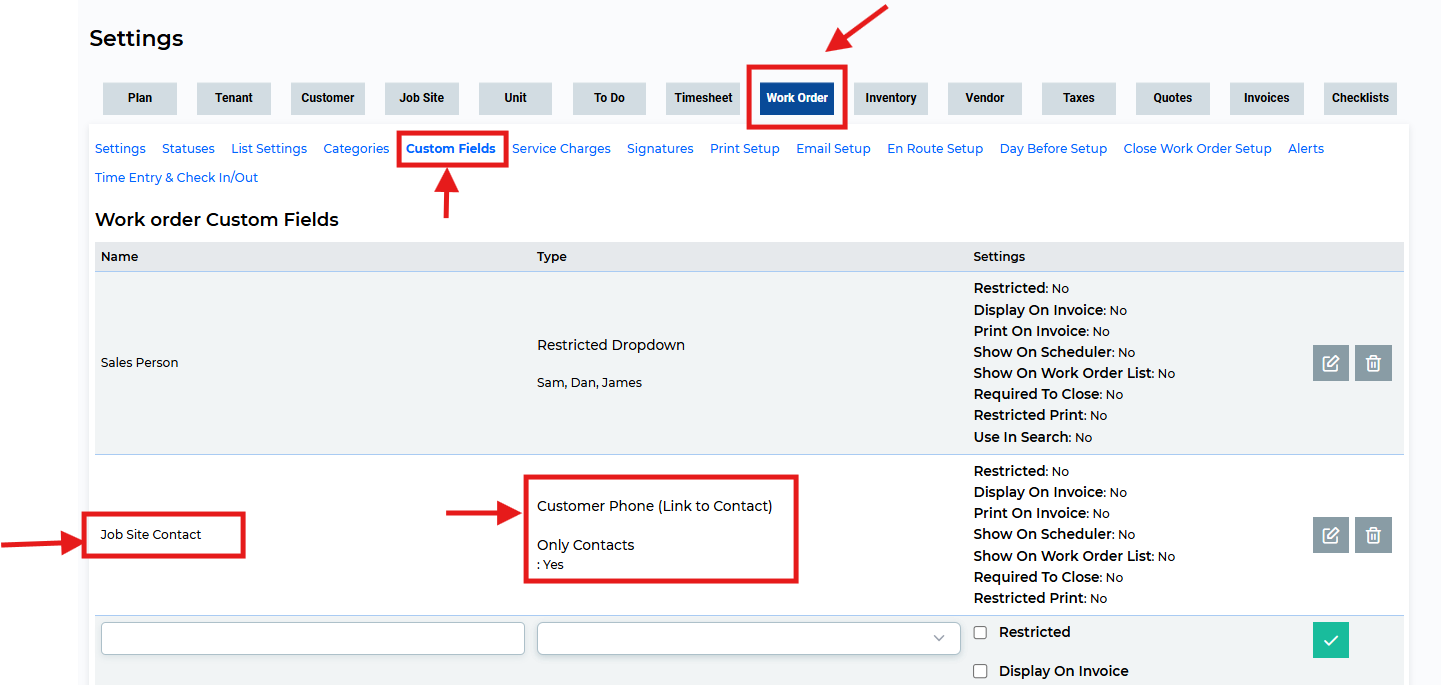
If you create a column like this, then in the work order, you will be able to choose from phone numbers for customers and linked contacts:
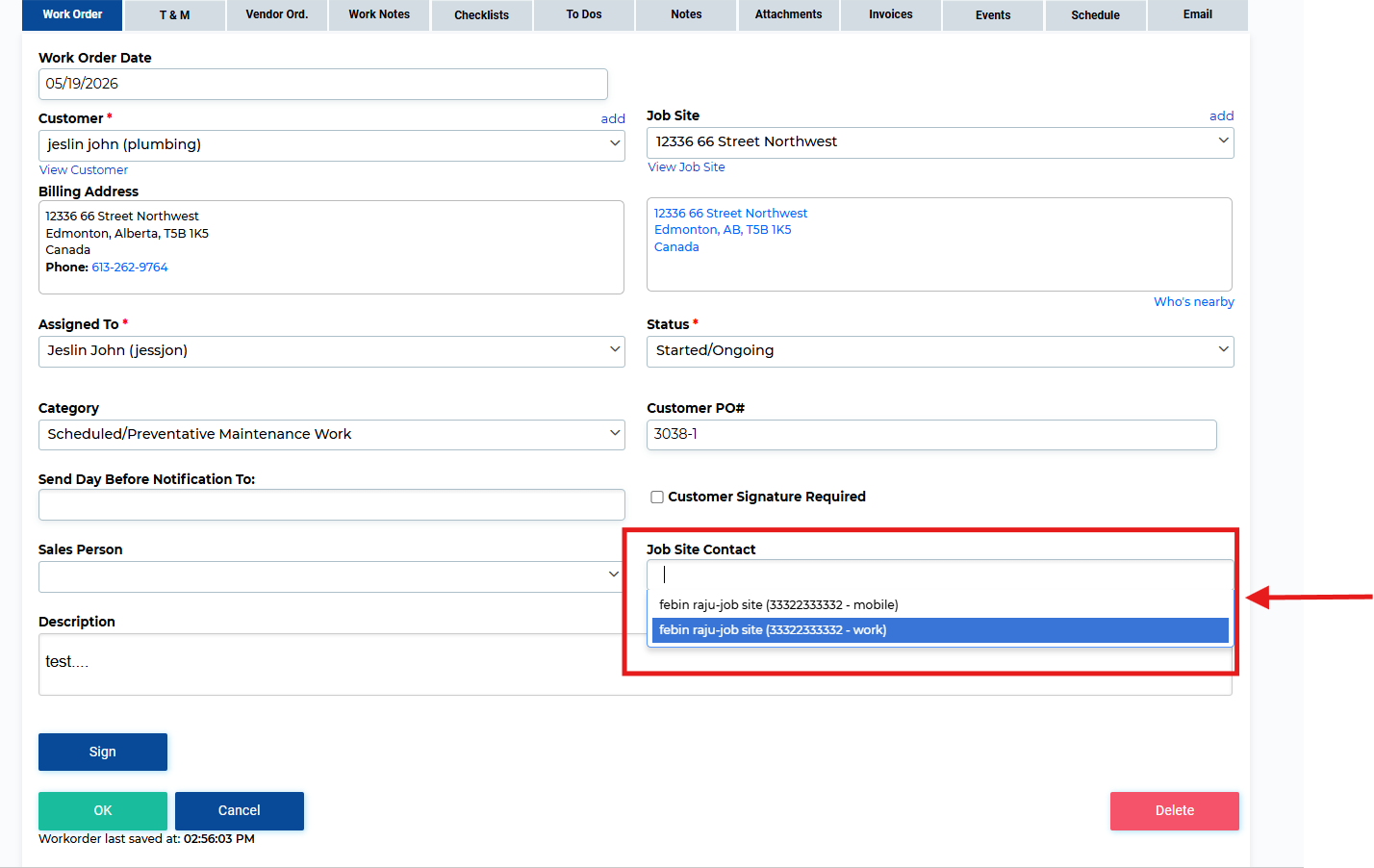
Once selected, the entry shows a link that will popup full contact information for the customer or contact with clickable links to make phone calls: Clicking any of the phone numbers in this dialog will dial the number.
### **Need Help?**
If you have any questions or need support, please click the Help button in your ServiceBox account or email us at **support@getservicebox.com**.
- [Video Learning](https://learn.getservicebox.com/video-learning?hsLang=en#main-content)
- [Accounting Integrations](https://learn.getservicebox.com/video-learning?hsLang=en#accounting-integrations)
- [FAQs](https://learn.getservicebox.com/faqs?hsLang=en)
- [Getting started](https://learn.getservicebox.com/getting-started?hsLang=en#main-content)
- [User Guides](https://learn.getservicebox.com/getting-started?hsLang=en#user-guides)
- [ServiceBox Mobile](https://learn.getservicebox.com/servicebox-mobile?hsLang=en#main-content)
- [Getting Started](https://learn.getservicebox.com/servicebox-mobile?hsLang=en#getting-started)
- [User Guide Technician](https://learn.getservicebox.com/servicebox-mobile?hsLang=en#user-guide-technician)
- [User Guide Admin](https://learn.getservicebox.com/servicebox-mobile?hsLang=en#user-guide-admin)
- [FAQ](https://learn.getservicebox.com/servicebox-mobile?hsLang=en#faq)
- [New Release](https://learn.getservicebox.com/servicebox-mobile?hsLang=en#new-release)
- [Invoices](https://learn.getservicebox.com/invoices?hsLang=en#main-content)
- [Getting Started](https://learn.getservicebox.com/invoices?hsLang=en#getting-started)
- [Advanced Functionality](https://learn.getservicebox.com/invoices?hsLang=en#advanced-functionality)
- [User Guide](https://learn.getservicebox.com/invoices?hsLang=en#user-guide)
- [FAQ](https://learn.getservicebox.com/invoices?hsLang=en#faq)
- [Quotes](https://learn.getservicebox.com/quotes?hsLang=en#main-content)
- [Getting Started](https://learn.getservicebox.com/quotes?hsLang=en#getting-started)
- [User Guide](https://learn.getservicebox.com/quotes?hsLang=en#user-guide)
- [Advanced Functionality](https://learn.getservicebox.com/quotes?hsLang=en#advanced-functionality)
- [FAQ](https://learn.getservicebox.com/quotes?hsLang=en#faq)
- [Work Orders](https://learn.getservicebox.com/work-orders?hsLang=en#main-content)
- [Getting Started](https://learn.getservicebox.com/work-orders?hsLang=en#getting-started)
- [User Guide](https://learn.getservicebox.com/work-orders?hsLang=en#user-guide)
- [Advanced Functionalities](https://learn.getservicebox.com/work-orders?hsLang=en#advanced-functionalities)
- [Work Order - FAQ](https://learn.getservicebox.com/work-orders?hsLang=en#work-order-faq)
- [Job Sites](https://learn.getservicebox.com/job-sites?hsLang=en#main-content)
- [User Guide](https://learn.getservicebox.com/job-sites?hsLang=en#user-guide)
- [Advanced Functionality](https://learn.getservicebox.com/job-sites?hsLang=en#advanced-functionality)
- [FAQ](https://learn.getservicebox.com/job-sites?hsLang=en#faq)
- [Recurring Work](https://learn.getservicebox.com/recurring-work?hsLang=en#main-content)
- [User Guide](https://learn.getservicebox.com/recurring-work?hsLang=en#user-guide)
- [FAQ](https://learn.getservicebox.com/recurring-work?hsLang=en#faq)
- [Scheduler](https://learn.getservicebox.com/scheduler?hsLang=en#main-content)
- [User Guide](https://learn.getservicebox.com/scheduler?hsLang=en#user-guide)
- [Advanced Functionality](https://learn.getservicebox.com/scheduler?hsLang=en#advanced-functionality)
- [FAQ](https://learn.getservicebox.com/scheduler?hsLang=en#faq)
- [Timesheets](https://learn.getservicebox.com/timesheets?hsLang=en#main-content)
- [User Guide](https://learn.getservicebox.com/timesheets?hsLang=en#user-guide)
- [Advanced Functionality](https://learn.getservicebox.com/timesheets?hsLang=en#advanced-functionality)
- [FAQ](https://learn.getservicebox.com/timesheets?hsLang=en#faq)
- [Inventory](https://learn.getservicebox.com/inventory?hsLang=en#main-content)
- [User Guides](https://learn.getservicebox.com/inventory?hsLang=en#user-guides)
- [FAQ](https://learn.getservicebox.com/inventory?hsLang=en#faq)
- [Vendor Orders](https://learn.getservicebox.com/vendor-orders?hsLang=en#main-content)
- [Getting Started](https://learn.getservicebox.com/vendor-orders?hsLang=en#getting-started)
- [Advanced Functionality](https://learn.getservicebox.com/vendor-orders?hsLang=en#advanced-functionality)
- [User Guide](https://learn.getservicebox.com/vendor-orders?hsLang=en#user-guide)
- [FAQ](https://learn.getservicebox.com/vendor-orders?hsLang=en#faq)
- [Reporting](https://learn.getservicebox.com/reporting?hsLang=en#main-content)
- [Getting Started](https://learn.getservicebox.com/reporting?hsLang=en#getting-started)
- [FAQ](https://learn.getservicebox.com/reporting?hsLang=en#faq)
- [User Guide](https://learn.getservicebox.com/reporting?hsLang=en#user-guide)
- [Integrations](https://learn.getservicebox.com/integrations?hsLang=en#main-content)
- [Accounting Connector](https://learn.getservicebox.com/integrations?hsLang=en#accounting-connector)
- [ServiceBox Payments](https://learn.getservicebox.com/integrations?hsLang=en#servicebox-payments)
- [Product Updates](https://learn.getservicebox.com/product-updates?hsLang=en)
- [Data Services](https://learn.getservicebox.com/data-services?hsLang=en#main-content)
- [FAQ](https://learn.getservicebox.com/data-services?hsLang=en#faq)
- [QuickBooks Desktop](https://learn.getservicebox.com/quickbooks-desktop?hsLang=en#main-content)
- [User Guide](https://learn.getservicebox.com/quickbooks-desktop?hsLang=en#user-guide)
- [Getting Started](https://learn.getservicebox.com/quickbooks-desktop?hsLang=en#getting-started)
- [FAQ](https://learn.getservicebox.com/quickbooks-desktop?hsLang=en#faq)
- [QuickBooks Online](https://learn.getservicebox.com/quickbooks-online?hsLang=en#main-content)
- [Getting Started](https://learn.getservicebox.com/quickbooks-online?hsLang=en#getting-started)
- [User Guide](https://learn.getservicebox.com/quickbooks-online?hsLang=en#user-guide)
- [FAQ](https://learn.getservicebox.com/quickbooks-online?hsLang=en#faq)
- [Printing](https://learn.getservicebox.com/printing?hsLang=en)
- [Sage 50 (Canada)](https://learn.getservicebox.com/sage-50-canada?hsLang=en#main-content)
- [Configuration](https://learn.getservicebox.com/sage-50-canada?hsLang=en#configuration)
- [FAQ](https://learn.getservicebox.com/sage-50-canada?hsLang=en#faq)
- [User Guide](https://learn.getservicebox.com/sage-50-canada?hsLang=en#user-guide)
- [First Steps for ServiceBox Users](https://learn.getservicebox.com/first-steps-for-servicebox-users?hsLang=en#main-content)
- [User Guide](https://learn.getservicebox.com/first-steps-for-servicebox-users?hsLang=en#user-guide)
- [FAQ](https://learn.getservicebox.com/first-steps-for-servicebox-users?hsLang=en#faq)
- [Configuring Your ServiceBox Site](https://learn.getservicebox.com/configuring-your-servicebox-site?hsLang=en#main-content)
- [Getting Started](https://learn.getservicebox.com/configuring-your-servicebox-site?hsLang=en#getting-started)
- [User Guides](https://learn.getservicebox.com/configuring-your-servicebox-site?hsLang=en#user-guides)
- [FAQ](https://learn.getservicebox.com/configuring-your-servicebox-site?hsLang=en#faq)
- [Advanced Functionality](https://learn.getservicebox.com/configuring-your-servicebox-site?hsLang=en#advanced-functionality)
- [Customer](https://learn.getservicebox.com/customer?hsLang=en#main-content)
- [User Guide](https://learn.getservicebox.com/customer?hsLang=en#user-guide)
- [Advanced Functionality](https://learn.getservicebox.com/customer?hsLang=en#advanced-functionality)
- [FAQ](https://learn.getservicebox.com/customer?hsLang=en#faq)
- [Notes](https://learn.getservicebox.com/notes?hsLang=en)
- [To Dos](https://learn.getservicebox.com/to-dos?hsLang=en#main-content)
- [Getting Started](https://learn.getservicebox.com/to-dos?hsLang=en#getting-started)
- [To Dos - User Guide](https://learn.getservicebox.com/to-dos?hsLang=en#to-dos-user-guide)
- [Vendor](https://learn.getservicebox.com/vendor?hsLang=en#main-content)
- [User Guide](https://learn.getservicebox.com/vendor?hsLang=en#user-guide)
[![sblogo-whiteandtransparent120x30\[8666\]](https://learn.getservicebox.com/hs-fs/hubfs/sblogo-whiteandtransparent120x30%5B8666%5D.png?width=120&height=30&name=sblogo-whiteandtransparent120x30%5B8666%5D.png "sblogo-whiteandtransparent120x30[8666]")](https://learn.getservicebox.com/knowledge-base?hsLang=en)
Copyright © 2026