---
title: Unlink Customer, Jobsite, Invoice and Resync it Back to QuickBooks Online
description: Unlink Customer, Jobsite, Invoice and Resync it Back to QuickBooks Online
---
[Skip to content](https://learn.getservicebox.com/unlink-customer-jobsite-invoice-and-resync-it-back-to-quickbooks-online#main-content)
English
Show submenu for translations
[](https://learn.getservicebox.com/knowledge-base?hsLang=en)
Open main navigation
Close main navigation
- English
Show submenu for translations
How can we help you?
- There are no suggestions because the search field is empty.
1. [ServiceBox Support Knowledge Base](https://learn.getservicebox.com/?hsLang=en)
2. [QuickBooks Online](https://learn.getservicebox.com/quickbooks-online?hsLang=en)
3. [User Guide](https://learn.getservicebox.com/quickbooks-online?hsLang=en#user-guide)
# Unlink Customer, Jobsite, Invoice and Resync it Back to QuickBooks Online
## Follow these steps to safely unlink and resync invoices, customers, and jobsites between ServiceBox and QuickBooks Online.
### **Summary**
Efficient management of invoices, customers, and jobsites is crucial for maintaining accurate financial records in accounting software. In this instructional article, we'll guide you through the process of unlinking invoices, customers, or jobsites, deleting invoices in QuickBooks Online, and then resyncing the data to ensure seamless integration.
### **Delete Invoice in QuickBooks Online (Skip this step if an Invoice is not yet synced to QuickBooks Online):**
Before proceeding with the unlinking process, it is necessary to delete invoices in QuickBooks Online. Follow these steps if an invoice has already been synced:
- Open the Customer Record in QuickBooks:
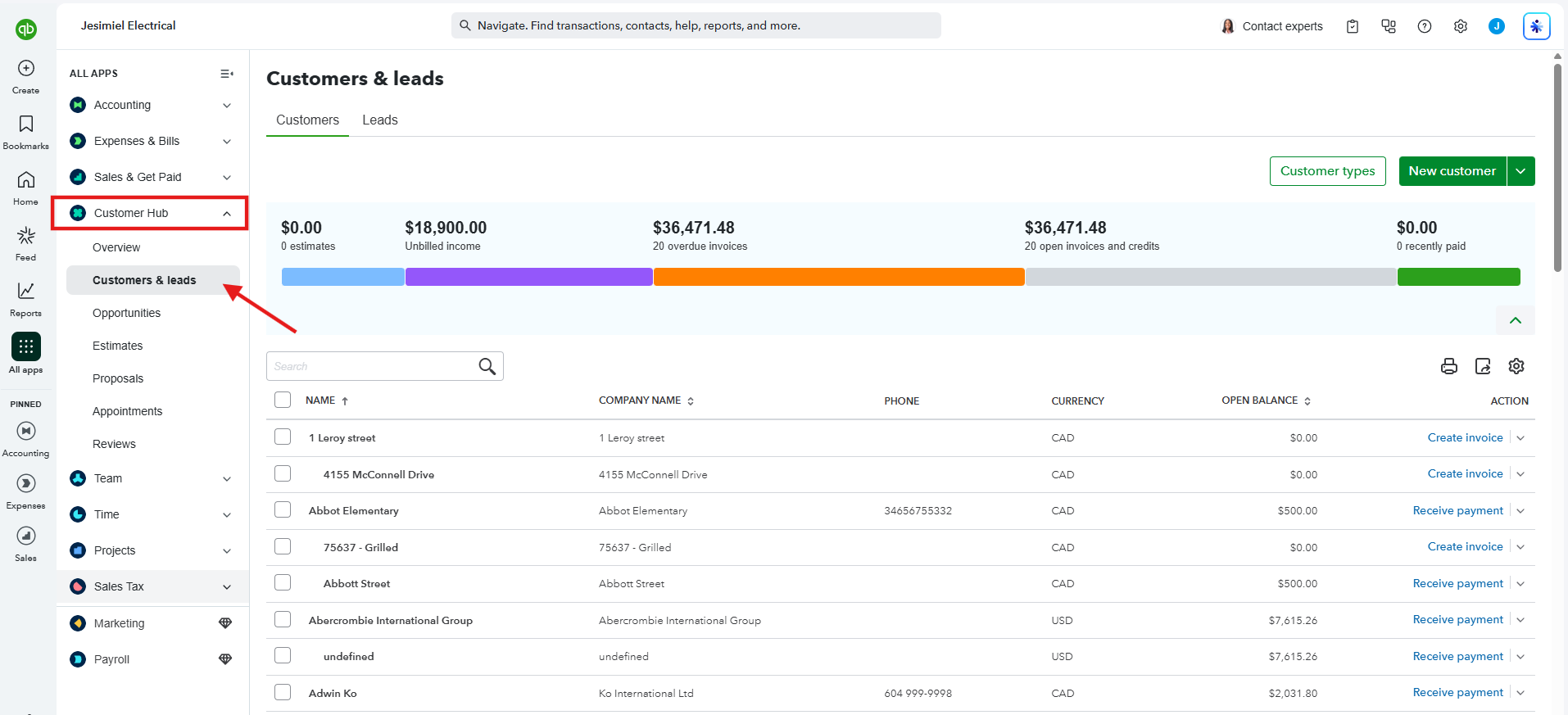
- Navigate to Customer Hub --\> Customers & Leads.
- Click on the customer whose invoice you want to delete.
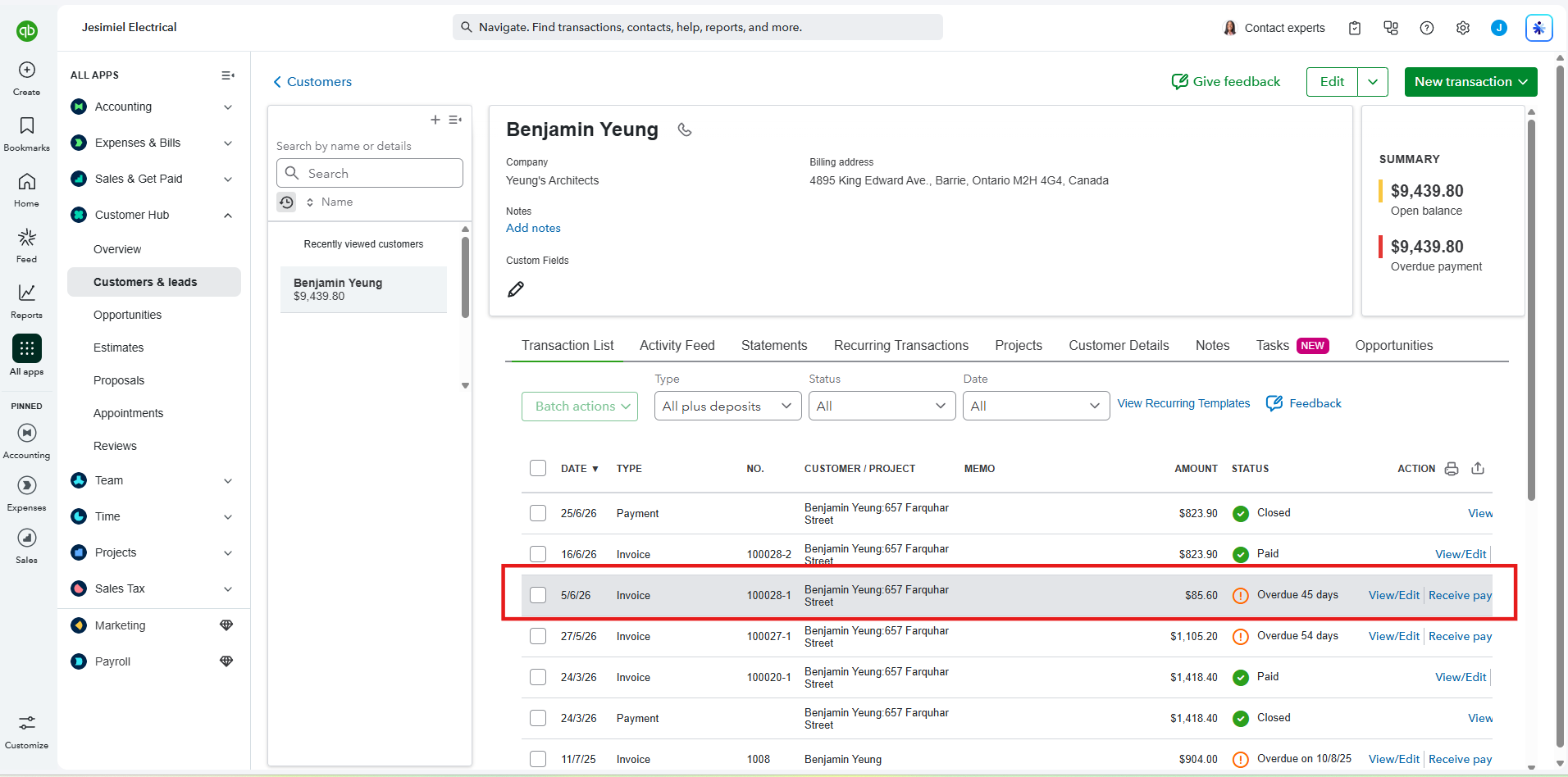
- Select and Delete the Invoice:
- Choose the specific invoice from the list.
[](https://s3.amazonaws.com/cdn.freshdesk.com/data/helpdesk/attachments/production/19124187829/original/sVRpCm12AbO9RXAXqdpeX5Cqs12xUvI47Q.png?1709909738)
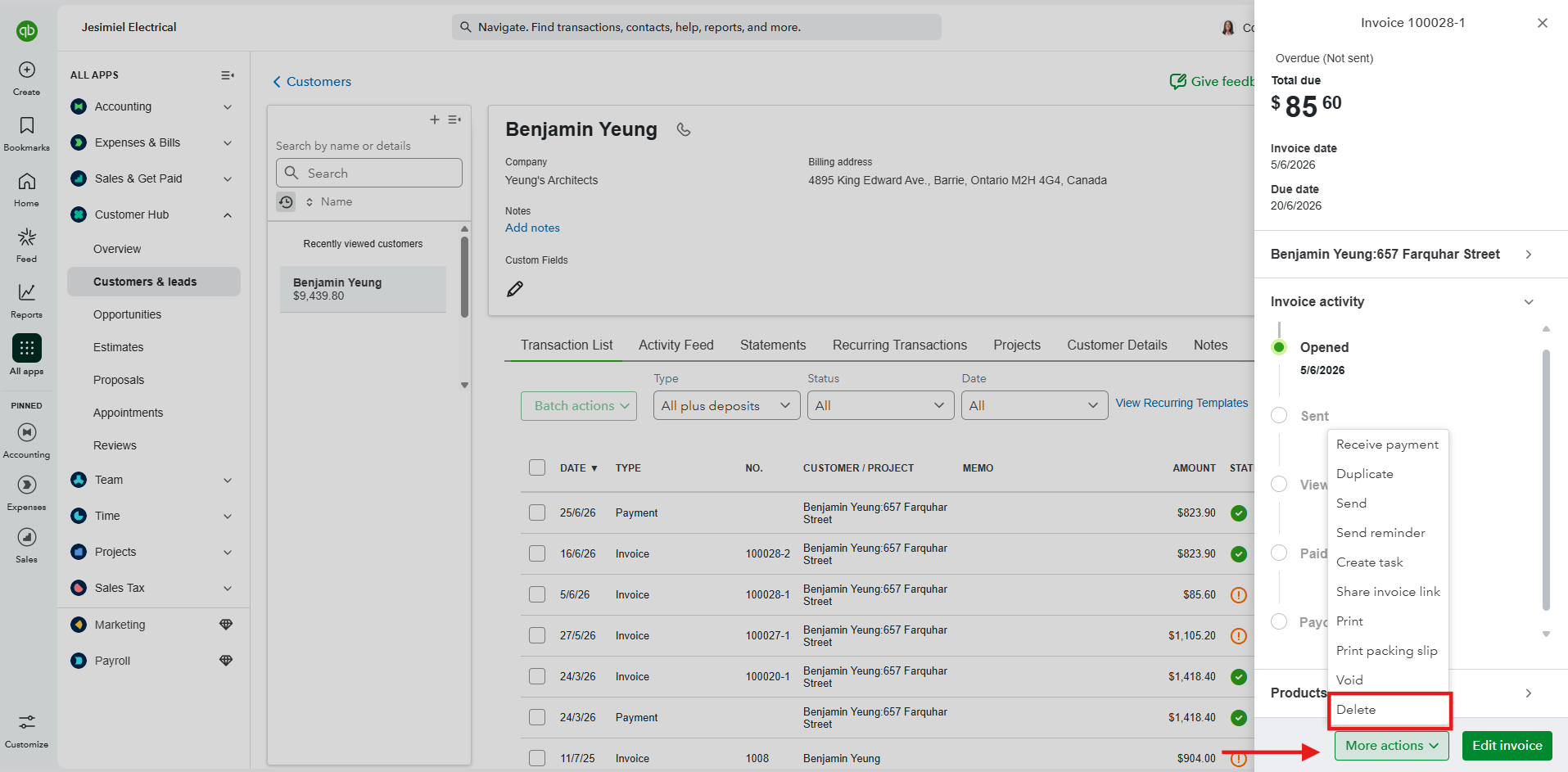
- Under "More Actions," select "Delete" to remove the invoice.
[](https://s3.amazonaws.com/cdn.freshdesk.com/data/helpdesk/attachments/production/19124010956/original/XvGc7jcE8_iZ1zjLQ51iuUJdpeguXpKO3Q.png?1709663138)
### **Unlinking Invoices in ServiceBox**
Unlinking invoices in ServiceBox is a crucial step:
- Open the Invoice:
- Remove Link:
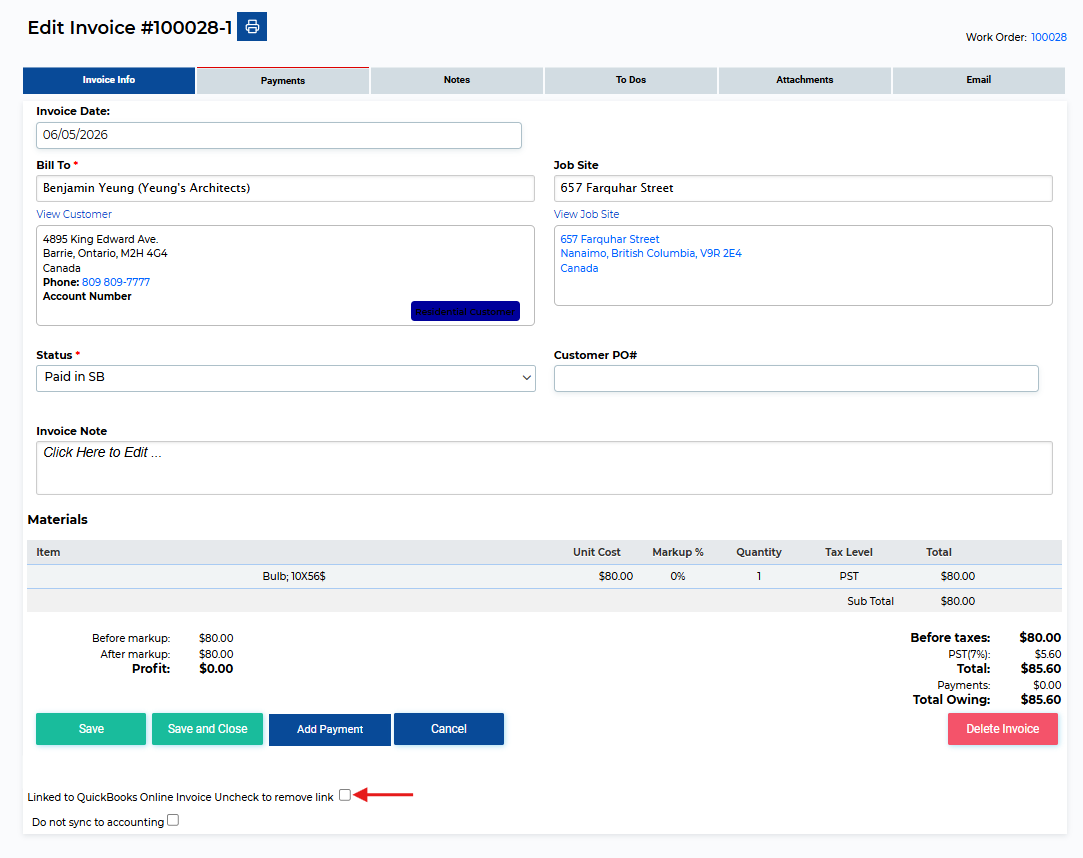
- Locate the option "Linked to QuickBooks Invoice."
- Uncheck the box to sever the link between the invoice in ServiceBox and QuickBooks Online.
**[](https://s3.amazonaws.com/cdn.freshdesk.com/data/helpdesk/attachments/production/19124010759/original/eyrdBU2j9fV9oMQyteTX8ktMMvqQH4Zumg.png?1709662944)**
### **Unlinking Customers in ServiceBox**
Now, let's move on to unlinking customers in ServiceBox:
- Open the Customer:
- Access the customer profile in ServiceBox.
- Navigate to Links and Remove:
- Click on the "Links" button.
[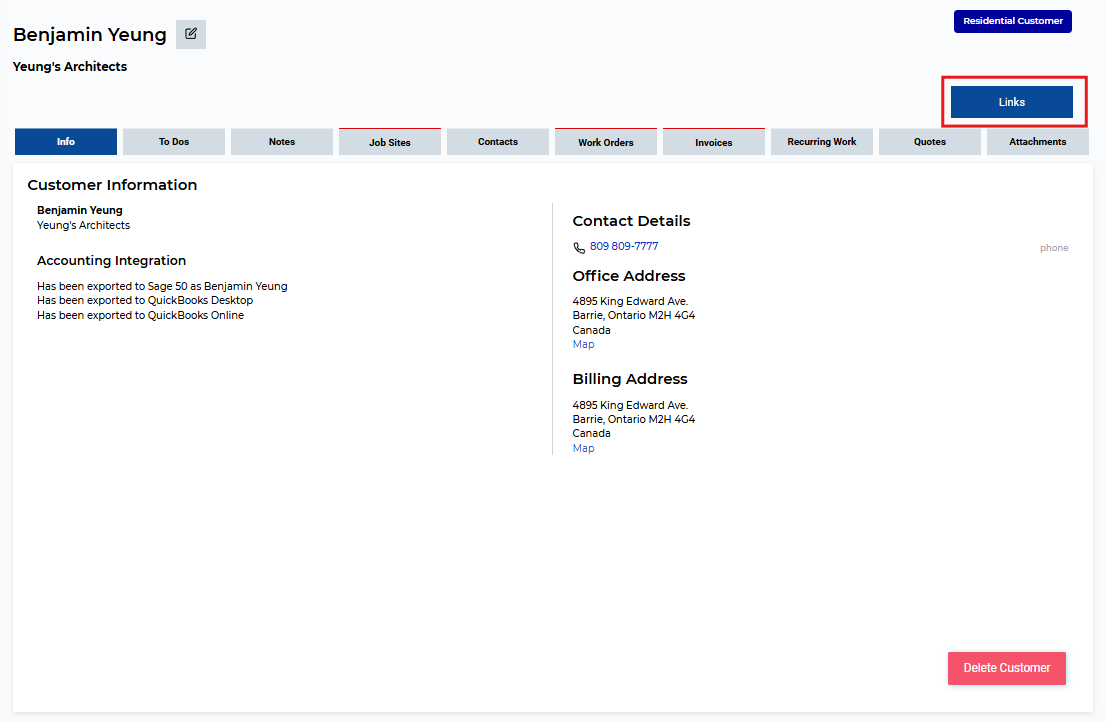](https://s3.amazonaws.com/cdn.freshdesk.com/data/helpdesk/attachments/production/19124189064/original/LN4eWbAz_lS0xF-zUxbGAB1RkXiFzpJngg.png?1709910707)
- Press the "Delete" button to eliminate the link between the customer in ServiceBox and QuickBooks Online.
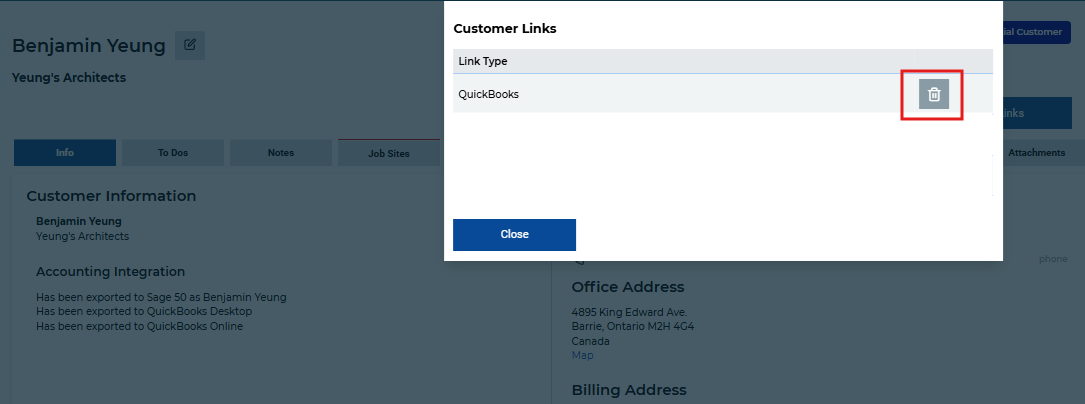
### **Unlinking Jobsites in ServiceBox**
To unlink jobsites in ServiceBox, follow these steps:
- Open the Jobsite:
- Access the jobsite in ServiceBox.
- Remove Link:
- Click on the "Links" button.
**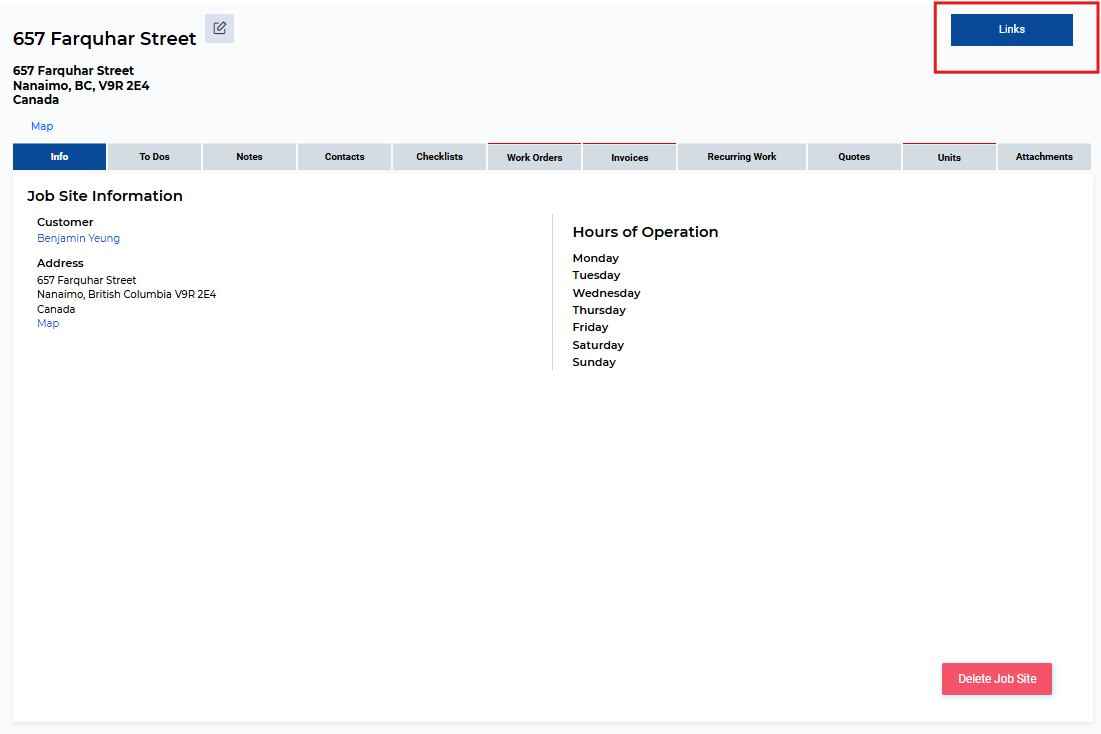**
- Select "Delete" to sever the link between the jobsite and QuickBooks Online.
**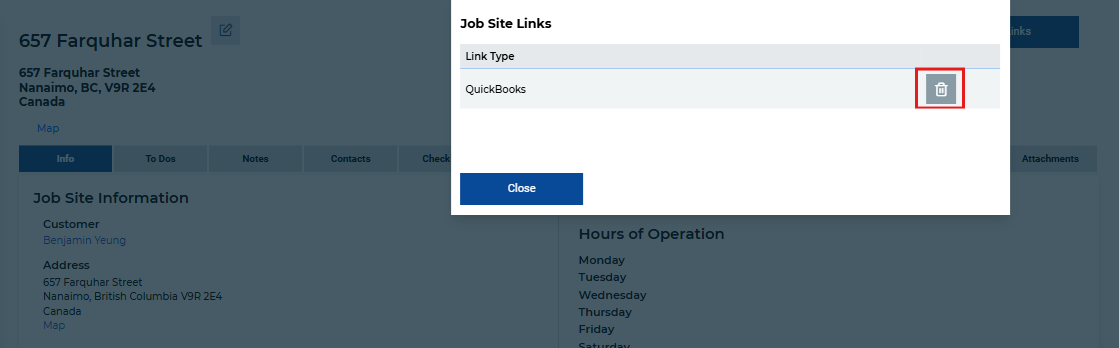**
### **Running the Sync Again**
Once you have successfully unlinked invoices, customers, and jobsites, it's time to resync the data:
- Run the Synchronization Process:
- In ServiceBox, initiate the synchronization process again.
### **Conclusion**
By following these comprehensive steps, you ensure that your financial records remain accurate and up-to-date across both ServiceBox and QuickBooks Online. This streamlined approach to unlinking and resyncing guarantees a seamless integration, promoting an error-free and efficient financial management system for your business. Regularly performing these checks and updates contributes to the overall health and reliability of your accounting processes.
### **Need Help?**
If you have any questions or need support, please click the **Help** button in your ServiceBox account or email us at **support@getservicebox.com**.
- [Video Learning](https://learn.getservicebox.com/video-learning?hsLang=en#main-content)
- [Accounting Integrations](https://learn.getservicebox.com/video-learning?hsLang=en#accounting-integrations)
- [FAQs](https://learn.getservicebox.com/faqs?hsLang=en)
- [Getting started](https://learn.getservicebox.com/getting-started?hsLang=en#main-content)
- [User Guides](https://learn.getservicebox.com/getting-started?hsLang=en#user-guides)
- [ServiceBox Mobile](https://learn.getservicebox.com/servicebox-mobile?hsLang=en#main-content)
- [Getting Started](https://learn.getservicebox.com/servicebox-mobile?hsLang=en#getting-started)
- [User Guide Technician](https://learn.getservicebox.com/servicebox-mobile?hsLang=en#user-guide-technician)
- [User Guide Admin](https://learn.getservicebox.com/servicebox-mobile?hsLang=en#user-guide-admin)
- [FAQ](https://learn.getservicebox.com/servicebox-mobile?hsLang=en#faq)
- [New Release](https://learn.getservicebox.com/servicebox-mobile?hsLang=en#new-release)
- [Invoices](https://learn.getservicebox.com/invoices?hsLang=en#main-content)
- [Getting Started](https://learn.getservicebox.com/invoices?hsLang=en#getting-started)
- [Advanced Functionality](https://learn.getservicebox.com/invoices?hsLang=en#advanced-functionality)
- [User Guide](https://learn.getservicebox.com/invoices?hsLang=en#user-guide)
- [FAQ](https://learn.getservicebox.com/invoices?hsLang=en#faq)
- [Quotes](https://learn.getservicebox.com/quotes?hsLang=en#main-content)
- [Getting Started](https://learn.getservicebox.com/quotes?hsLang=en#getting-started)
- [User Guide](https://learn.getservicebox.com/quotes?hsLang=en#user-guide)
- [Advanced Functionality](https://learn.getservicebox.com/quotes?hsLang=en#advanced-functionality)
- [FAQ](https://learn.getservicebox.com/quotes?hsLang=en#faq)
- [Work Orders](https://learn.getservicebox.com/work-orders?hsLang=en#main-content)
- [Getting Started](https://learn.getservicebox.com/work-orders?hsLang=en#getting-started)
- [User Guide](https://learn.getservicebox.com/work-orders?hsLang=en#user-guide)
- [Advanced Functionalities](https://learn.getservicebox.com/work-orders?hsLang=en#advanced-functionalities)
- [Work Order - FAQ](https://learn.getservicebox.com/work-orders?hsLang=en#work-order-faq)
- [Job Sites](https://learn.getservicebox.com/job-sites?hsLang=en#main-content)
- [User Guide](https://learn.getservicebox.com/job-sites?hsLang=en#user-guide)
- [Advanced Functionality](https://learn.getservicebox.com/job-sites?hsLang=en#advanced-functionality)
- [FAQ](https://learn.getservicebox.com/job-sites?hsLang=en#faq)
- [Recurring Work](https://learn.getservicebox.com/recurring-work?hsLang=en#main-content)
- [User Guide](https://learn.getservicebox.com/recurring-work?hsLang=en#user-guide)
- [FAQ](https://learn.getservicebox.com/recurring-work?hsLang=en#faq)
- [Scheduler](https://learn.getservicebox.com/scheduler?hsLang=en#main-content)
- [User Guide](https://learn.getservicebox.com/scheduler?hsLang=en#user-guide)
- [Advanced Functionality](https://learn.getservicebox.com/scheduler?hsLang=en#advanced-functionality)
- [FAQ](https://learn.getservicebox.com/scheduler?hsLang=en#faq)
- [Timesheets](https://learn.getservicebox.com/timesheets?hsLang=en#main-content)
- [User Guide](https://learn.getservicebox.com/timesheets?hsLang=en#user-guide)
- [Advanced Functionality](https://learn.getservicebox.com/timesheets?hsLang=en#advanced-functionality)
- [FAQ](https://learn.getservicebox.com/timesheets?hsLang=en#faq)
- [Inventory](https://learn.getservicebox.com/inventory?hsLang=en#main-content)
- [User Guides](https://learn.getservicebox.com/inventory?hsLang=en#user-guides)
- [FAQ](https://learn.getservicebox.com/inventory?hsLang=en#faq)
- [Vendor Orders](https://learn.getservicebox.com/vendor-orders?hsLang=en#main-content)
- [Getting Started](https://learn.getservicebox.com/vendor-orders?hsLang=en#getting-started)
- [Advanced Functionality](https://learn.getservicebox.com/vendor-orders?hsLang=en#advanced-functionality)
- [User Guide](https://learn.getservicebox.com/vendor-orders?hsLang=en#user-guide)
- [FAQ](https://learn.getservicebox.com/vendor-orders?hsLang=en#faq)
- [Reporting](https://learn.getservicebox.com/reporting?hsLang=en#main-content)
- [Getting Started](https://learn.getservicebox.com/reporting?hsLang=en#getting-started)
- [FAQ](https://learn.getservicebox.com/reporting?hsLang=en#faq)
- [User Guide](https://learn.getservicebox.com/reporting?hsLang=en#user-guide)
- [Integrations](https://learn.getservicebox.com/integrations?hsLang=en#main-content)
- [Accounting Connector](https://learn.getservicebox.com/integrations?hsLang=en#accounting-connector)
- [ServiceBox Payments](https://learn.getservicebox.com/integrations?hsLang=en#servicebox-payments)
- [Product Updates](https://learn.getservicebox.com/product-updates?hsLang=en)
- [Data Services](https://learn.getservicebox.com/data-services?hsLang=en#main-content)
- [FAQ](https://learn.getservicebox.com/data-services?hsLang=en#faq)
- [QuickBooks Desktop](https://learn.getservicebox.com/quickbooks-desktop?hsLang=en#main-content)
- [User Guide](https://learn.getservicebox.com/quickbooks-desktop?hsLang=en#user-guide)
- [Getting Started](https://learn.getservicebox.com/quickbooks-desktop?hsLang=en#getting-started)
- [FAQ](https://learn.getservicebox.com/quickbooks-desktop?hsLang=en#faq)
- [QuickBooks Online](https://learn.getservicebox.com/quickbooks-online?hsLang=en#main-content)
- [Getting Started](https://learn.getservicebox.com/quickbooks-online?hsLang=en#getting-started)
- [User Guide](https://learn.getservicebox.com/quickbooks-online?hsLang=en#user-guide)
- [FAQ](https://learn.getservicebox.com/quickbooks-online?hsLang=en#faq)
- [Printing](https://learn.getservicebox.com/printing?hsLang=en)
- [Sage 50 (Canada)](https://learn.getservicebox.com/sage-50-canada?hsLang=en#main-content)
- [Configuration](https://learn.getservicebox.com/sage-50-canada?hsLang=en#configuration)
- [FAQ](https://learn.getservicebox.com/sage-50-canada?hsLang=en#faq)
- [User Guide](https://learn.getservicebox.com/sage-50-canada?hsLang=en#user-guide)
- [First Steps for ServiceBox Users](https://learn.getservicebox.com/first-steps-for-servicebox-users?hsLang=en#main-content)
- [User Guide](https://learn.getservicebox.com/first-steps-for-servicebox-users?hsLang=en#user-guide)
- [FAQ](https://learn.getservicebox.com/first-steps-for-servicebox-users?hsLang=en#faq)
- [Configuring Your ServiceBox Site](https://learn.getservicebox.com/configuring-your-servicebox-site?hsLang=en#main-content)
- [Getting Started](https://learn.getservicebox.com/configuring-your-servicebox-site?hsLang=en#getting-started)
- [User Guides](https://learn.getservicebox.com/configuring-your-servicebox-site?hsLang=en#user-guides)
- [FAQ](https://learn.getservicebox.com/configuring-your-servicebox-site?hsLang=en#faq)
- [Advanced Functionality](https://learn.getservicebox.com/configuring-your-servicebox-site?hsLang=en#advanced-functionality)
- [Customer](https://learn.getservicebox.com/customer?hsLang=en#main-content)
- [User Guide](https://learn.getservicebox.com/customer?hsLang=en#user-guide)
- [Advanced Functionality](https://learn.getservicebox.com/customer?hsLang=en#advanced-functionality)
- [FAQ](https://learn.getservicebox.com/customer?hsLang=en#faq)
- [Notes](https://learn.getservicebox.com/notes?hsLang=en)
- [To Dos](https://learn.getservicebox.com/to-dos?hsLang=en#main-content)
- [Getting Started](https://learn.getservicebox.com/to-dos?hsLang=en#getting-started)
- [To Dos - User Guide](https://learn.getservicebox.com/to-dos?hsLang=en#to-dos-user-guide)
- [Vendor](https://learn.getservicebox.com/vendor?hsLang=en#main-content)
- [User Guide](https://learn.getservicebox.com/vendor?hsLang=en#user-guide)
[![sblogo-whiteandtransparent120x30\[8666\]](https://learn.getservicebox.com/hs-fs/hubfs/sblogo-whiteandtransparent120x30%5B8666%5D.png?width=120&height=30&name=sblogo-whiteandtransparent120x30%5B8666%5D.png "sblogo-whiteandtransparent120x30[8666]")](https://learn.getservicebox.com/knowledge-base?hsLang=en)
Copyright © 2026