
Summary
Increase the professionalism of your business by using a physical device to take payments directly at a job site. The added benefit is that all the payment information will be put into ServiceBox directly to eliminate any redundant processing.
This document details the Handpoint device integration with ServiceBox Payments. In order to use a HandPoint device in your business, you will need to have a merchant account for ServiceBox Payments. For more information about ServiceBox Payments, click here.
What is a Handpoint Device?
An exciting new addition to our product offerings is the ability for you to use a physical payment device to take credit card payments in the office or remotely. Your technicians can use a Handpoint device that they can connect to their phone via Bluetooth. Once the device is connected to your ServiceBox account, all transactions processed through the device will be captured in your ServiceBox account.
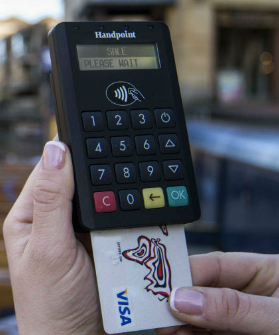
What does a Handpoint Device Cost?
For the HiLite Handpoint Device displayed above, please log into your Merchant account with PaySafe and request your need to purchase of a new device. The team would provide a price list based on your locations and needs.
How do you get a Handpoint Device?
For the HiLite Handpoint Device, we will need you to submit a Handpoint Device Order form to our partners at PaySafe. Once you fill out the application form (a PDF) you will send it to their support team, where they will process the order for the handpoint device. You will be able to choose the number of devices and the location to send the devices to. The devices you order will be added as a debit in your ServiceBox Payment account, so you will pay for the devices as you use them.
Need Help?
If you have any questions or need support, please click the Help button in your ServiceBox account or email us at support@getservicebox.com.